> ## Documentation Index
> Fetch the complete documentation index at: https://ampersand-24eb5c1a-cobalt0s-google-contacts.mintlify.site/llms.txt
> Use this file to discover all available pages before exploring further.
# Pipedrive
## What's Supported
### Supported Actions
This connector supports:
* [Read Actions](/read-actions) including full historic backfill. Please note that incremental read is not supported, a full read of the Pipedrive instance will be done for each scheduled read.
* [Write Actions](/write-actions)
* [Proxy Actions](/proxy-actions), using the base URL `https://api.pipedrive.com`.
### Supported Objects
The Pipedrive connector support reading from the following objects:
* [Activities](https://developers.pipedrive.com/docs/api/v1/Activities#getActivities)
* [Activity Fields](https://developers.pipedrive.com/docs/api/v1/ActivityFields#getActivityFields)
* [Activity Types](https://developers.pipedrive.com/docs/api/v1/ActivityTypes#getActivityTypes)
* [Call Logs](https://developers.pipedrive.com/docs/api/v1/CallLogs#getUserCallLogs)
* [Currencies](https://developers.pipedrive.com/docs/api/v1/Currencies#getCurrencies)
* [Deals](https://developers.pipedrive.com/docs/api/v1/Deals#getDeals)
* [Deal Fields](https://developers.pipedrive.com/docs/api/v1/DealFields#getDealFields)
* [Files](https://developers.pipedrive.com/docs/api/v1/Files#getFiles)
* [Filters](https://developers.pipedrive.com/docs/api/v1/Filters#getFilters)
* [Leads](https://developers.pipedrive.com/docs/api/v1/Leads#getLeads)
* [Lead Labels](https://developers.pipedrive.com/docs/api/v1/LeadLabels#getLeadLabels)
* [Lead Sources](https://developers.pipedrive.com/docs/api/v1/LeadSources#getLeadSources)
* [LegacyTeams](https://developers.pipedrive.com/docs/api/v1/LegacyTeams#getTeams)
* [Notes](https://developers.pipedrive.com/docs/api/v1/Notes#getNotes)
* [Note Fields](https://developers.pipedrive.com/docs/api/v1/NoteFields#getNoteFields)
* [Organizations](https://developers.pipedrive.com/docs/api/v1/Organizations#getOrganizations)
* [Organization Fields](https://developers.pipedrive.com/docs/api/v1/OrganizationFields)
* [Organization Relationships](https://developers.pipedrive.com/docs/api/v1/OrganizationRelationships#getOrganizationRelationships)
* [Permission Sets](https://developers.pipedrive.com/docs/api/v1/PermissionSets#getPermissionSets)
* [Persons](https://developers.pipedrive.com/docs/api/v1/Persons#getPersons)
* [Person Fields](https://developers.pipedrive.com/docs/api/v1/PersonFields#getPersonFields)
* [Pipelines](https://developers.pipedrive.com/docs/api/v1/Pipelines#getPipeline)
* [Products](https://developers.pipedrive.com/docs/api/v1/Products#getProducts)
* [Product Fields](https://developers.pipedrive.com/docs/api/v1/ProductFields#getProductFields)
* [Projects](https://developers.pipedrive.com/docs/api/v1/Projects#getProjects)
* [Project Templates](https://developers.pipedrive.com/docs/api/v1/ProjectTemplates#getProjectTemplates)
* [Recents](https://developers.pipedrive.com/docs/api/v1/Recents#getRecents)
* [Roles](https://developers.pipedrive.com/docs/api/v1/Roles#getRoles)
* [Stages](https://developers.pipedrive.com/docs/api/v1/Stages#getStages)
* [Tasks](https://developers.pipedrive.com/docs/api/v1/Tasks#getTasks)
* [Users](https://developers.pipedrive.com/docs/api/v1/Users#getUsers)
* [User Connections](https://developers.pipedrive.com/docs/api/v1/UserConnections#getUserConnections)
* [User Settings](https://developers.pipedrive.com/docs/api/v1/UserSettings#getUserSettings)
* [Webhooks](https://developers.pipedrive.com/docs/api/v1/Webhooks#getWebhooks)
The Pipedrive connector support writing to the following objects:
* [Activities](https://developers.pipedrive.com/docs/api/v1/Activities#addActivity)
* [Activity Types](https://developers.pipedrive.com/docs/api/v1/ActivityTypes#addActivityType)
* [Call Logs](https://developers.pipedrive.com/docs/api/v1/CallLogs#addCallLog)
* [Channels](https://developers.pipedrive.com/docs/api/v1/Channels#addChannel)
* [Currencies](https://developers.pipedrive.com/docs/api/v1/Currencies)
* [Deals](https://developers.pipedrive.com/docs/api/v1/Deals#getDeals)
* [Deal Fields](https://developers.pipedrive.com/docs/api/v1/DealFields#addDealField)
* [Files](https://developers.pipedrive.com/docs/api/v1/Files#addFile)
* [Filters](https://developers.pipedrive.com/docs/api/v1/Filters#addFilter)
* [Leads](https://developers.pipedrive.com/docs/api/v1/Leads#addLead)
* [Lead Labels](https://developers.pipedrive.com/docs/api/v1/LeadLabels#addLeadLabel)
* [legacy Teams](https://developers.pipedrive.com/docs/api/v1/LegacyTeams#addTeam)
* [Notes](https://developers.pipedrive.com/docs/api/v1/Notes#addNote)
* [Organizations](https://developers.pipedrive.com/docs/api/v1/Organizations#addOrganization)
* [Organization Fields](https://developers.pipedrive.com/docs/api/v1/OrganizationFields#addOrganizationField)
* [Organization Relationship](https://developers.pipedrive.com/docs/api/v1/OrganizationRelationships#addOrganizationRelationship)
* [Person](https://developers.pipedrive.com/docs/api/v1/Persons#addPerson)
* [Person Fields](https://developers.pipedrive.com/docs/api/v1/PersonFields#addPersonField)
* [Pipelines](https://developers.pipedrive.com/docs/api/v1/Pipelines#addPipeline)
* [Products](https://developers.pipedrive.com/docs/api/v1/Products#addProduct)
* [Product Fields](https://developers.pipedrive.com/docs/api/v1/ProductFields#addProductField)
* [Projects](https://developers.pipedrive.com/docs/api/v1/Projects#addProject)
* [Roles](https://developers.pipedrive.com/docs/api/v1/Roles#addRole)
* [Stages](https://developers.pipedrive.com/docs/api/v1/Stages#addStage)
* [Tasks](https://developers.pipedrive.com/docs/api/v1/Tasks#addTask)
* [Users](https://developers.pipedrive.com/docs/api/v1/Users#addUser)
* [Webhooks](https://developers.pipedrive.com/docs/api/v1/Webhooks#addWebhook)
### Example Integration
For an example manifest file of a Pipedrive integration, visit our [samples repo on Github](https://github.com/amp-labs/samples/blob/main/pipedrive/amp.yaml).
## Before You Get Started
To integrate Pipedrive with Ampersand, you will need [a Pipedrive Account](https://www.pipedrive.com/signup).
Once your account is created, you'll need to create an app in Pipedrive, configure the Ampersand redirect URI within the app, and obtain the following credentials from your app:
* OAuth Client ID
* OAuth Client Secret
You will then use these credentials to connect your application to Ampersand.
### Create a Pipedrive Account
Here's how you can sign up for a Pipedrive account:
* Go to the [Pipedrive Sign Up page](https://www.pipedrive.com/signup).
* Sign up using your preferred method.
### Creating a Pipedrive App
Follow the steps below to create a Pipedrive app and add the Ampersand redirect URL.
1. Log in to your [Pipedrive](https://app.pipedrive.com/login) account.
2. Go to [Developer Hub](https://marketplace.pipedrive.com/app/manage).
3. Click the **Create an app** button.
4. Select **Create private app**.
5. Enter the following app details:
* **App Name**: The name of your app.
* **Callback URL**: Enter the Ampersand redirect URL: `https://api.withampersand.com/callbacks/v1/oauth`.
6. In the **OAuth and access scopes** section, select the relevant scopes for your app.
7. Click **Save**.
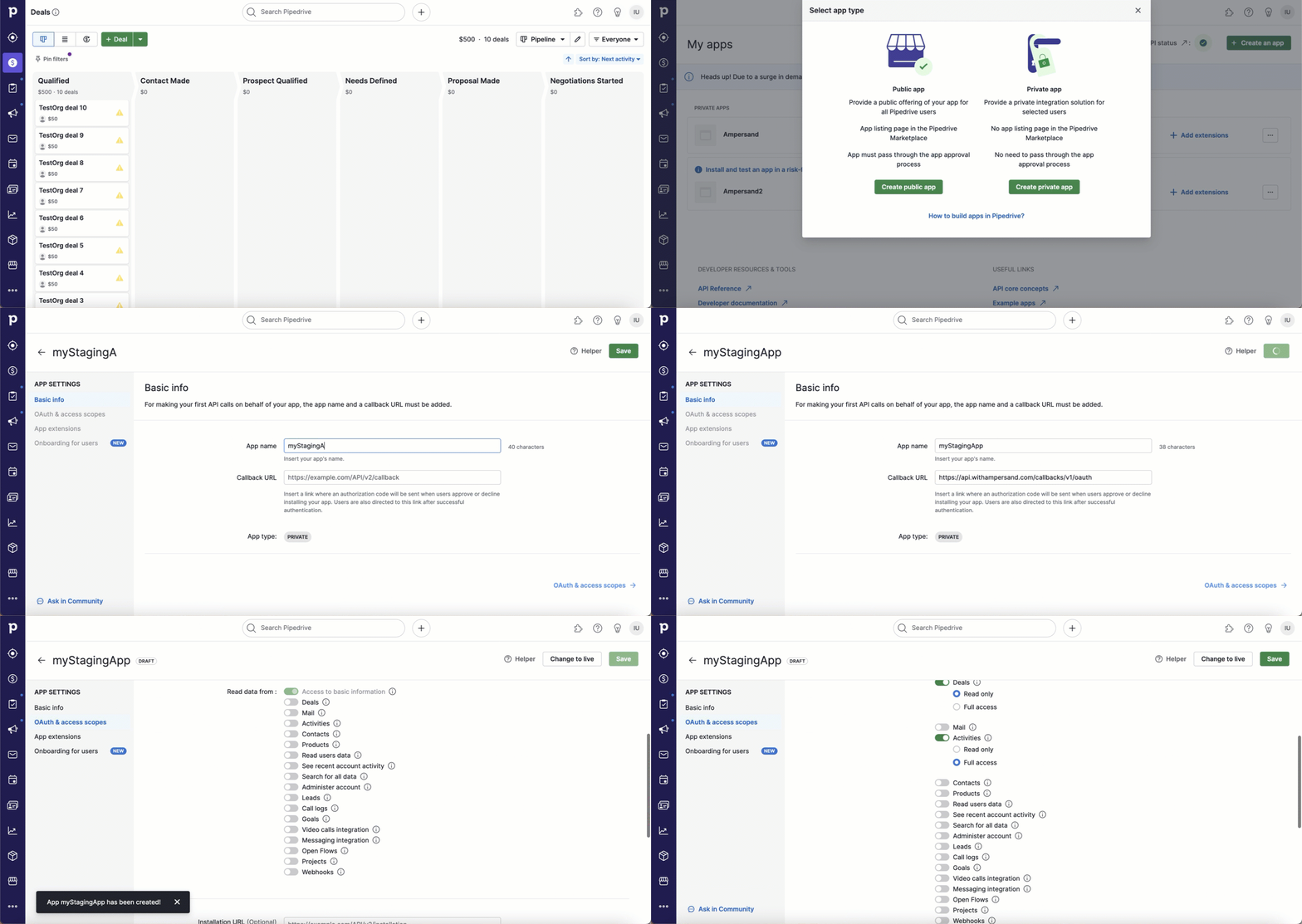 In the \*\*Client ID \*\*section of **OAuth and access scopes**, you will find the **Client ID** and **Client Secret** keys. Note these keys, as they are essential for connecting your app to Ampersand.
 ## Add Your Pipedrive App Info to Ampersand
1. Log in to your [Ampersand Dashboard](https://dashboard.withampersand.com).
2. Select the project where you want to create a Pipedrive integration.
## Add Your Pipedrive App Info to Ampersand
1. Log in to your [Ampersand Dashboard](https://dashboard.withampersand.com).
2. Select the project where you want to create a Pipedrive integration.
 3. Select **Provider Apps**.
4. Select *Pipedrive* from the **Provider** list.
5. Enter the previously obtained *Client ID* in the **Client ID** field and *Client Secret* in the **Client Secret** field.
6. Click **Save Changes**.
3. Select **Provider Apps**.
4. Select *Pipedrive* from the **Provider** list.
5. Enter the previously obtained *Client ID* in the **Client ID** field and *Client Secret* in the **Client Secret** field.
6. Click **Save Changes**.